 VeriMile
The audit-ready mileage log that never bills you monthly
Start. Drive. Stop. VeriMile records your miles from GPS as they happen, tags every trip with its purpose, and turns the whole year into a clean PDF or CSV your accountant can actually read. Free to track. No account. No ads. Your mileage log never leaves your device.
- Unlimited trips, free
- No sign-up
- No ads, ever
- Works offline
Why VeriMile exists
Mileage apps got expensive. The mileage log did not get better.
The best-known trackers bill by the month, and a recurring monthly charge for what amounts to a list of dates and distances adds up fast. Those apps also tend to run in the background all day to detect your drives for you, collecting where you went, and then ask you to sort your private life out of your business miles afterward. VeriMile does neither: you tap Start, and nothing runs in between.
Verified, not guessed
Distance is measured by GPS while you drive, and the date and time are recorded as it happens. That is a contemporaneous record, which is exactly the kind of log tax time and expense reports ask for.
Private by design
Your trips live on your phone, and on iPhone in your own iCloud. We never receive your locations, routes, addresses, trip names, or your log. What we do collect is a short list of anonymous usage events, printed in full further down this page.
Priced like a tool
Tracking is free forever with no trip cap, and there is no trial countdown waiting to cut you off. Pro adds the exports for a flat yearly price, and if you would rather not subscribe at all, a single tax year can be unlocked outright.
How it works
Three taps is the whole product
VeriMile is deliberately small. There is no dashboard to configure, no rules engine to train, and no onboarding maze between you and your first logged mile.
Start
Tap Start Trip in the app, on the Home Screen widget, or from the Android Quick Settings tile. Siri and Shortcuts work too: they open VeriMile and start the trip for you. Measuring begins immediately.
Drive
Miles tick up live. On iPhone the odometer runs on your Lock Screen and in the Dynamic Island; on Android a notification keeps the trip recording reliably in the background.
Stop
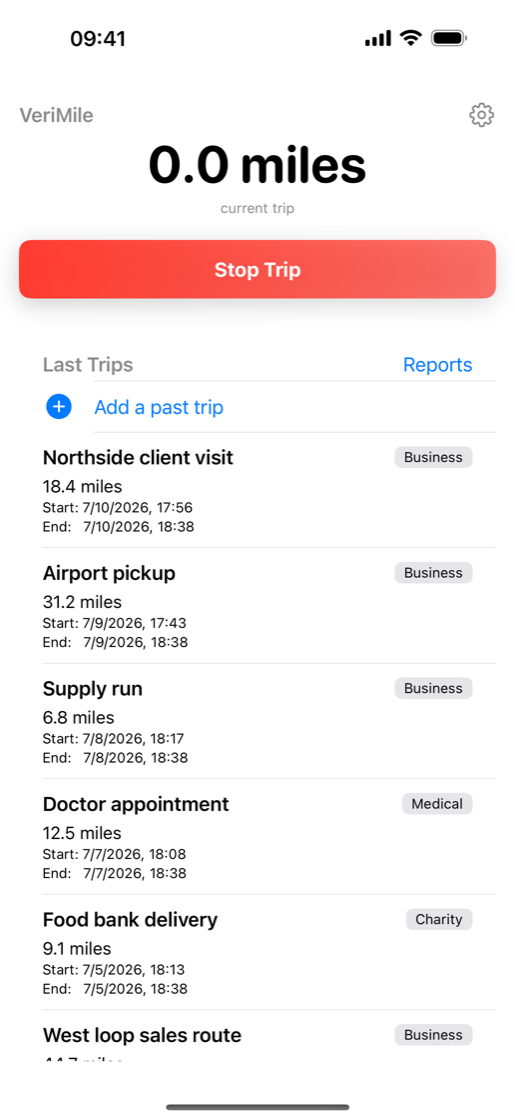
Confirm the stop, name the trip while you still remember what it was for, and pick a purpose: Business, Medical, Charity, or Personal. Logged.
Reports
A real tax year, not "the last 90 days"
Most trackers make you count backwards in days and hope the window lines up with a calendar year. VeriMile lets you pick the range you actually need, then hands you a document instead of a screenshot.
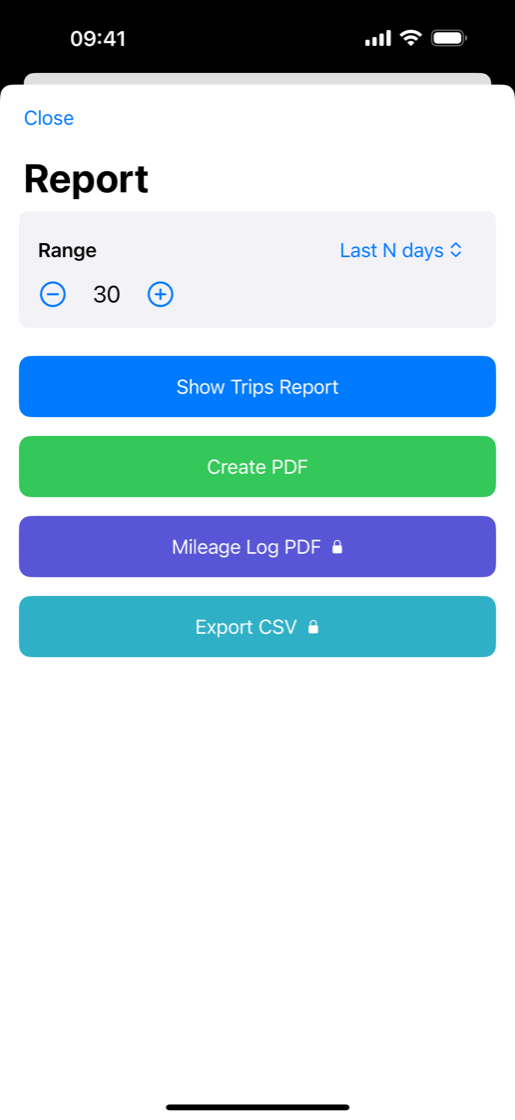
- Range picker: this year, last year, this month, last month, a number of recent days, or any custom start and end date.
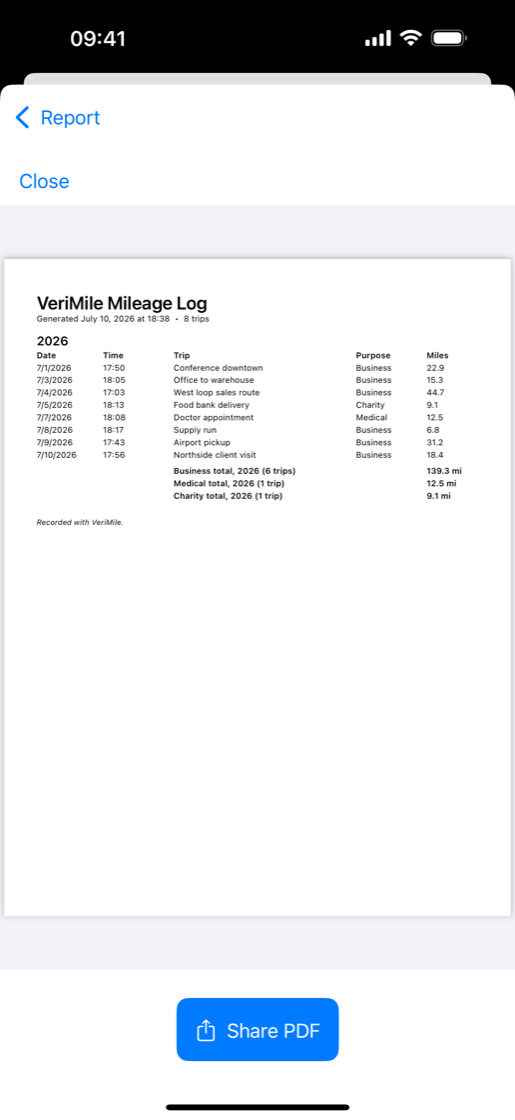
- Trips report on screen for a quick look before you export anything.
- Simple PDF in the free version, for a fast summary you can email.
- Mileage Log PDF with Pro: trips grouped by year, every one a row of date, time, name, purpose and distance, with a subtotal per purpose under each year.
- CSV export with Pro, including an entry column that marks each row as GPS, manual, or edited.
Honest records
Forgot to hit Start? Fix it without faking it
A log nobody trusts is worthless, and a log you cannot correct is worse. VeriMile lets you repair reality and then shows its work.
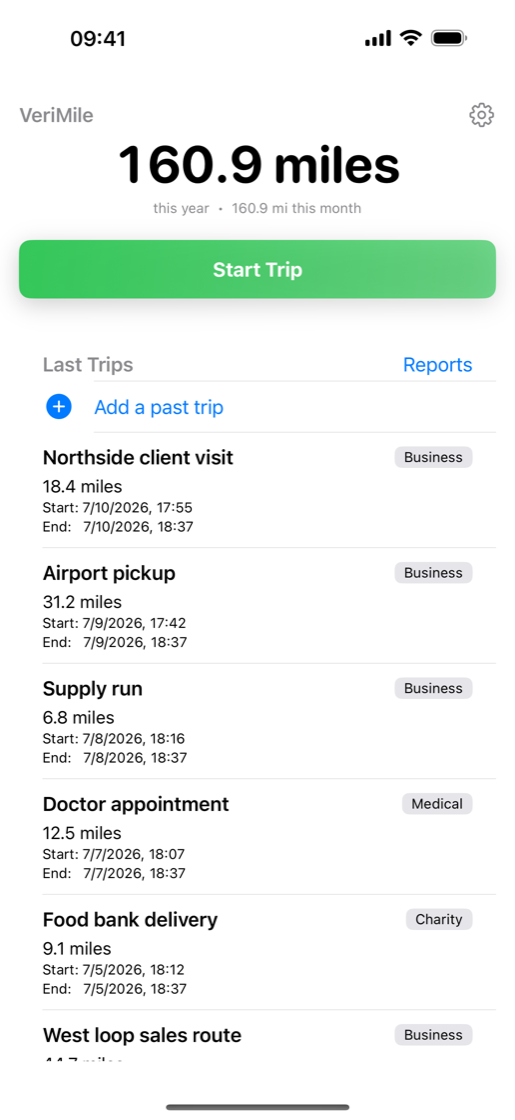
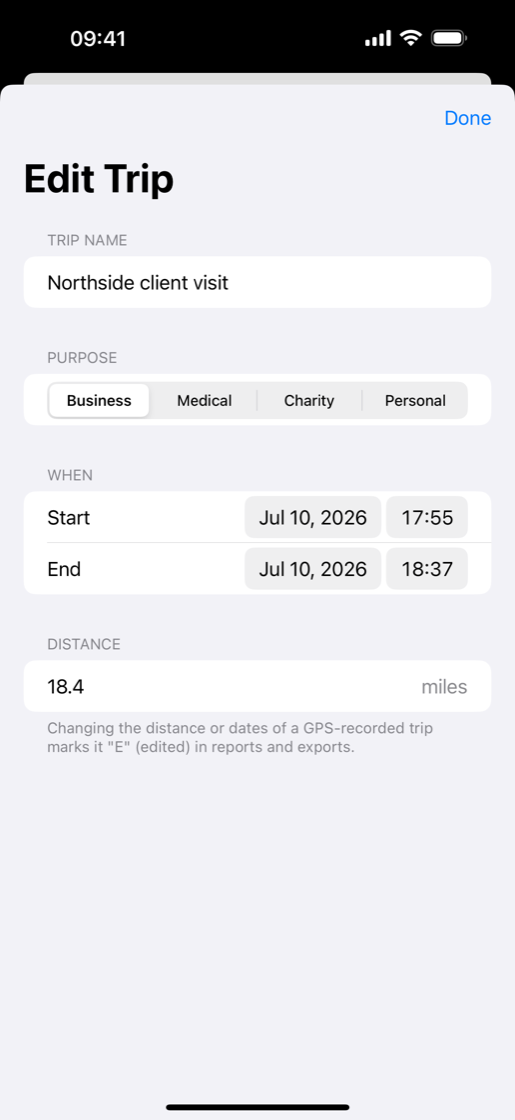
- Add a past trip by hand with its own date, time, distance and purpose.
- Edit anything, including distance and dates, when GPS drifts or a stop came late.
- Every correction is flagged. Manual entries and edited GPS trips carry a mark straight through to the PDF and CSV, so nobody has to take your word for it.
- Deleted trips go to a trash you can restore from for 30 days, and they stay out of your reports while they sit there.
Everything in the box
Small app, no missing pieces
Totals at a glance
Open the app and see miles this year and miles this month, before you tap anything.
Purpose on every trip
Business, Medical, Charity, or Personal, tagged at the moment you stop and totalled separately in your log.
Lock Screen odometer
On iPhone, a Live Activity shows elapsed time and miles while you drive, so you never wonder whether tracking is still running.
Widget and Siri
A Home Screen widget shows your year total and starts a trip in one tap. Ask Siri to start a trip and VeriMile opens and begins recording.
Built for Android too
A Quick Settings tile, a home screen widget, and a foreground service that keeps counting with the screen off.
iCloud sync
On iPhone and iPad your log syncs through your own iCloud account. No VeriMile account is involved, because there isn't one.
Miles or kilometers
Pick your unit once and every screen, report and export follows it. VeriMile works wherever you drive.
Light or dark
Follow the system or force light or dark. Readable at 6am in a driveway and at midnight on a delivery run.
Works offline
GPS needs no signal and reports are built on the device. Dead zones, basements and airplane mode are all fine.
Privacy
We see how the app is used. We never see where you drove.
Plenty of apps claim to be private. Here is the actual line, drawn in public, so you can hold us to it.
Stays on your device, always
- Your GPS locations and routes
- Start and end points, and any addresses
- Trip names and purposes
- Your mileage log and every report you generate
- On iPhone and iPad, sync happens in your own private iCloud database
What we do collect
- Anonymous usage events such as app launch, trip started, trip stopped, report created, purchase made, and errors
- A random device identifier that is not linked to your name, email, or any account
- For a finished trip, the distance and duration only, with no location attached
- The IP address and user agent that come with the request, the way any web server sees them
- No advertising identifiers, no ad networks, no third-party trackers, no data sold to anyone
Full detail is in the VeriMile privacy notice. There is no account to create, no email to hand over, and no password to lose.
Who it is for
If someone might ask you to prove those miles
Anyone who drives for a reason other than fun eventually needs a record with dates, distances and purposes on it. That record is all VeriMile does.
- Gig and delivery drivers
- Rideshare drivers
- Real estate agents
- Contractors and trades
- Sales reps on the road
- Small business owners
- Freelancers and consultants
- Home health and in-home care
- Volunteers logging charity miles
- Anyone tracking medical drives
- Employees filing reimbursement
Free and Pro
Track for free. Pay only when you need the paperwork.
No trial countdown, no trip cap, no ads holding your log hostage. The tracking is the free part, because a mileage log you stopped keeping is worth nothing.
Free
- Unlimited GPS trip tracking
- Named trips with purpose tags
- Year and month totals on screen
- Add and edit past trips
- Report date ranges and on-screen trips report
- Simple PDF report
- Widget, Siri, Quick Settings tile, Live Activity
- Miles or kilometers, light or dark
VeriMile Pro
- Everything in Free
- Mileage Log PDF with per-trip rows
- Subtotals by purpose within each year
- CSV export for spreadsheets and bookkeeping
- Manual and edited trips clearly flagged
- Unlimited exports, any date range, while it is active
Single year unlock
- Everything in Free
- Mileage Log PDF and CSV for one tax year
- Pay once, keep the exports
- Nothing renews and nothing expires on you
The App Store and Google Play each sell and price VeriMile Pro themselves, so the current price in your own currency, with any tax, is shown in the store before you confirm anything. Purchases are per store: an Apple purchase covers your Apple devices and a Google Play purchase covers your Android devices.
Straight answers
What VeriMile deliberately does not do
Every feature an app skips is a choice. Here are ours, in writing, so you can decide before you install rather than after.
No automatic drive detection
VeriMile does not watch you all day and guess which movements were drives. You tap Start. That is why nothing runs between trips, why your log has no phantom entries to clean up, and why we never learn your patterns.
No addresses or route maps
A trip is a distance, a start and end time, a name you chose, and a purpose. We do not store your start and end addresses or draw your route, which also means we cannot leak them. If your employer requires destinations, put them in the trip name.
No tax math and no rate tables
Your reports carry no rates and no dollar figures. Rates change and differ by country, purpose and employer, so VeriMile produces the mileage record and leaves the arithmetic to you, your employer, or your accountant. This is not tax advice.
Your miles, your records.
Install VeriMile, tap Start on your next drive, and stop worrying about whether you will be able to prove it later.
- Free to track
- No account
- No ads
- iPhone, iPad, Android
FAQ
Questions people actually ask
Does VeriMile track my drives automatically?
No, and that is deliberate. You tap Start when a trip begins and Stop when it ends, so VeriMile only ever measures the drives you choose to log. Location is used only between Start and Stop, and nothing runs in the background between trips, which keeps your log clean and your battery and privacy intact.
Starting is one tap from the app, the Home Screen widget, or the Quick Settings tile on Android. Siri and Shortcuts work too: they open VeriMile and start the trip for you.
Do I need an account to use VeriMile?
No. There is no sign-up, no login, and no password. Install the app and start your first trip. On iPhone and iPad your log can sync through your own iCloud account, which belongs to you and not to us.
Where is my mileage data stored?
On your device. On iPhone and iPad it also syncs through your own private iCloud database. VeriMile never uploads your locations, routes, addresses, trip names, or your mileage log to our servers.
What does the free version include?
Unlimited GPS trip tracking, named trips with purpose tags, manual and edited trips, year and month totals on screen, report date ranges, an on-screen trips report, and a simple PDF report. No ads and no trip limits.
What do I get with VeriMile Pro?
Pro unlocks the Mileage Log PDF, a per-trip log of date, time, trip name, purpose and distance with subtotals by purpose within each year, plus CSV export for spreadsheets and bookkeeping.
On the App Store, Pro is a yearly auto-renewing subscription you can cancel in your Apple subscription settings. On Google Play it is a one-time purchase that covers 365 days and does not auto-renew, so nothing recurs and you buy it again only if you still need it. Either way, a separate one-time purchase can unlock a single tax year's exports instead.
Can I add a drive I forgot to track?
Yes. Add a past trip lets you enter the date, time, distance and purpose by hand. Manual entries and any edits to a GPS trip are marked in every export, so anyone reviewing your log can see exactly which miles were measured and which were entered.
Does VeriMile calculate my deduction or reimbursement amount?
No. VeriMile produces the record, not the math. Reports contain dates, times, trip names, purposes, distances and totals, with no rates and no dollar figures. Rates change and vary by country, employer and purpose, so the numbers belong to you, your employer, or your accountant. VeriMile is not tax advice.
Does VeriMile work in kilometers?
Yes. Choose miles or kilometers in Settings and every screen, report and export follows your choice.
Does VeriMile need an internet connection?
No. Tracking uses your device's GPS and reports are generated on the device, so VeriMile works in a dead zone, on a plane, or with data turned off.
What happens if I delete a trip by mistake?
Deleted trips go to a trash rather than disappearing, so you can restore anything you removed by accident. Trips in the trash are excluded from your reports, and they are removed permanently after 30 days.
Which devices does VeriMile run on?
iPhone and iPad running iOS or iPadOS 17.6 or later, and Android phones. Purchases are per store, because Apple and Google each sell their own: an Apple purchase covers your Apple devices and a Google Play purchase covers your Android devices. Buying on one platform does not unlock the other.
Does tracking drain my battery?
Location is only used between Start and Stop, never in between, so VeriMile is idle when you are not on a trip. During a trip it behaves like any navigation app on your phone.